


Background
yh.dat located at Neverness To Everness\NTEGlobal\ResFilesM\3000001\bgimgs is an MJPEG file responsible for the launcher’s background animation, weighing in at a whopping 600 MB. Since Neverness to Everness forces the game to be bound to the launcher, running it in the background consumes up to 800 MB of RAM:
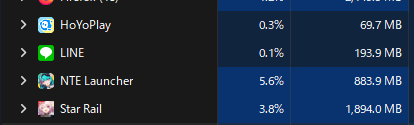
After optimization: 50 MB of RAM
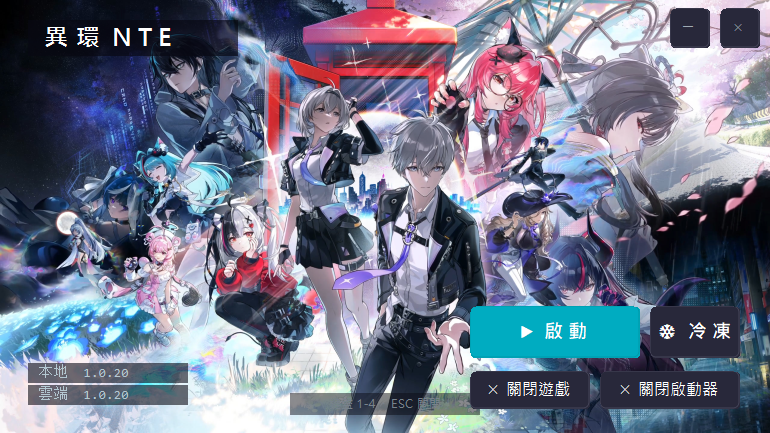
github: Click here to download
Must be placed in the game’s root directory.
Consumes only 20 MB of RAM, can be minimized to the system tray, and checks the resource version each time the game launches.
Quick keyboard shortcuts for features:
1 -> Launch game (automatically freezes/suspends the launcher) 2 -> Freeze 3 -> Close game 4 -> Close official launcher ESC -> Exit
Instructions
- Place this tool in the game’s root directory. (You can create a desktop shortcut, but the executable itself must remain in the game directory.)
- Run the tool.
- The tool will minimize to the system tray and automatically maintain memory optimization for the official launcher.
- You can close the tool, but you will lose continuous memory release capabilities. (Generally memory usage won’t spike too high anyway, since the background animation is already optimized.)
Technical Overview & How It Works
-
Uses FFMPEG to trim/extract the first frame, replacing the original
yh.dat. -
The launcher will detect file differences and force an update. In other words, when restarting the launcher, you need to restore the original
yh.dat, run the launcher once, and then replace it again:- Upon launch, it immediately terminates the launcher (if currently running).
- Restores the original
yh.dat. - Launches the launcher (wait for the normal update process to finish, used when a real version update is required).
- Trims the file with FFMPEG, launches the launcher, and restores it.
-
yh.datlaunch-day trimmed background asset: if you don’t want to use any scripts and prefer manual replacement, you can use this prepared file. Simply overwrite the file atNeverness To Everness\NTEGlobal\ResFilesM\3000001\bgimgs(make sure to back up the original first). -
However, since forced updates occur frequently, this manual approach is not recommended.
-
resize.ps1is a PowerShell script that uses ffmpeg to trim the original dat file. Place it in the game’s root directory (at the same level as theNTEGlobalfolder); it will rename the original file toyh.dat.bak. -
restore.ps1is a script that renamesyh.dat.bakback toyh.dat.